TruelineTurning document piles into clean data, with a human in the loop
- Role
- Design, development, deployment (solo)
- Timeline
- 1 day (~5 hours), solo
The problem
Small businesses receive invoices and receipts as PDFs and phone photos. Someone has to retype every one of them into a spreadsheet.
It is slow, nobody enjoys it, and the mistakes only surface later — in the accounts, where they cost real money.
The approach
- Upload a document and it comes back as structured data: supplier, dates, line items, tax and totals. Check it, then export a batch to CSV.
- AI extraction is never completely right, so the review step is the product rather than an afterthought. The extracted fields sit beside the original document, editable, and the app checks the sums itself: when the line items do not add up to the printed subtotal, it says so in plain words and shows the exact difference.
- The key decision was to tell the AI to copy what the document says and never to correct it. That sounds backwards until you follow it through — if the AI quietly fixes a wrong total, nobody ever learns the document was wrong. Copying it exactly is what lets the arithmetic check catch it.
- Only genuinely uncertain fields are flagged, because if everything is highlighted people stop looking. Nothing is ever approved automatically, and nothing the AI returns is saved until it has been checked.
- Deliberately not built: teams and roles, billing, accounting integrations, a mobile app. One idea done properly is worth more than five half-finished ones, and knowing where to stop is part of the job.
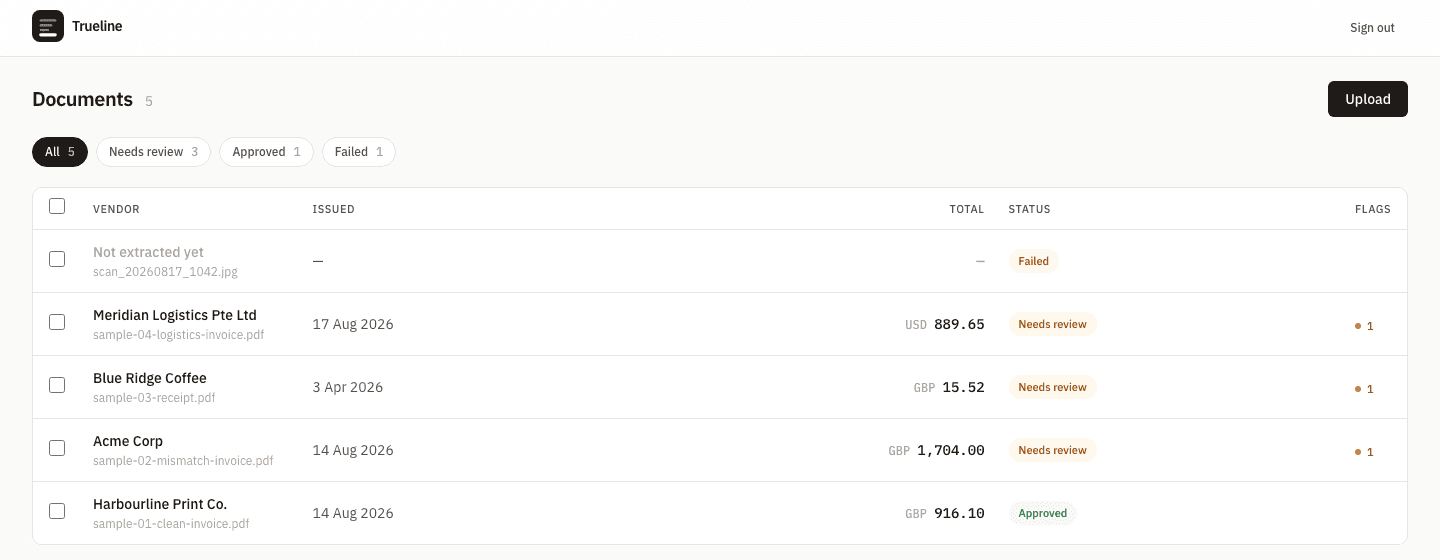
Every document's status at a glance, with a count of the fields that want a human. 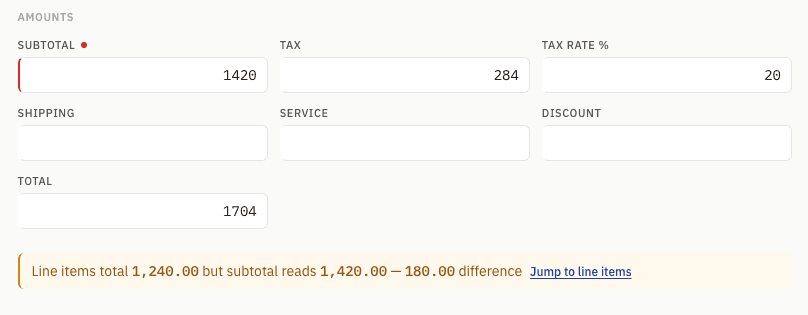
The review step. The app spotted that the line items total £1,240.00 while the subtotal reads £1,420.00, and shows the £180.00 difference instead of quietly picking a side.
The result
- Tested against the real Claude API on four sample documents: 6–7 seconds and roughly two US cents per single-page document.
- The arithmetic check does its job on a document built to break it — the AI reported the printed subtotal of £1,420.00 while the line items came to £1,240.00, and the app flagged the £180.00 gap instead of silently choosing one. An unclear date (03/04/2026) is left blank and flagged rather than guessed.
- 170 automated checks across four suites, all passing: the extraction pipeline, sign-in, every API route, and a full upload-to-export run.
- Honest limits: this is a demo built to show the approach. Four sample documents demonstrate the workflow rather than an accuracy benchmark, and the cost figure is measured on single-page files — a dense multi-page scan will cost more.
Tech details
Stack: Next.js 15 (App Router) · React 19 · TypeScript · Tailwind v4 · PostgreSQL 16 with Drizzle · Zod · Claude API
Architecture: API routes handle upload, extraction and export. Files go to storage behind a swappable interface; the pipeline claims a document, calls Claude with a structured-output schema, parses and validates the reply, then writes the extraction and its flags in one transaction. Every successful extraction lands on "needs review" — only a person moves it to approved.
- One Zod schema does four jobs: it defines the fields, generates the JSON Schema sent to the model, validates the reply at runtime, and gives the stored data its TypeScript type — so the field list cannot drift out of sync with itself.
- Failures are split into retryable and permanent. A malformed reply gets one repair attempt that names the offending fields; a bad API key gets none, because retrying a permanent failure just burns the budget.
- The database enforces its own invariants — generated columns and a partial unique index guarantee exactly one current extraction per document, rather than trusting the application to remember.
- Next.js
- Claude API
- PostgreSQL
- AI extraction
- Human-in-the-loop
Have a project in mind?
Get in touch